Regular Expressions & Finite-State Machines
Real data arrives messy: sample IDs typed three different ways, dates in five formats, FASTA headers packed with metadata, gigabytes of log files. A regular expression (regex) is a compact pattern language for finding, extracting, and cleaning text like this, and it is one of the highest-leverage skills for wrangling biological data.
Underneath, a regex is a small, elegant piece of computer science — a finite-state machine — and understanding that both explains its speed and warns you about the one thing it fundamentally cannot do.
A Regex Is a Finite-State Machine#
A finite-state machine (FSM) is an abstract machine with a finite set of states that reads input one character at a time, moving between states according to what it sees.
A regular expression compiles into exactly such a machine.
The pattern WF\d+ — the letters WF followed by one or more digits, a typical accession — becomes this:
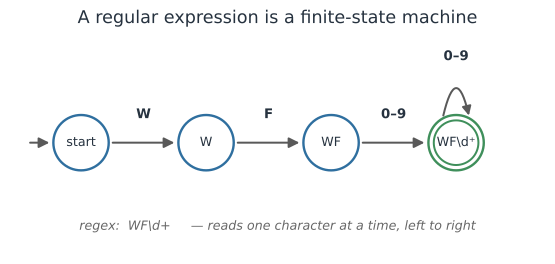
The machine starts at the left, consumes characters left to right, and if it lands in the accept state (double circle) the string matched. Two consequences fall out of this picture:
- Regex is fast — matching is a single linear scan, no backtracking required for well-behaved patterns.
- Regex cannot count. A finite machine has no memory of how many things it has seen, so it cannot match nested or balanced structure (see the limits section below).
The Core Syntax#
Most real patterns use a small vocabulary:
| Piece | Means | Example |
|---|---|---|
\d \w \s | digit, word char, whitespace | \d{4} = four digits |
[ACGT] | any one listed character | a DNA base |
[^>] | any char except those listed | not a > |
* + ? | zero+, one+, optional | A+ = one or more A’s |
{n,m} | between n and m repeats | \d{2,4} |
^ $ | start / end of string | ^> = header line |
(...) | a capture group | pull out a field |
\| | alternation (or) | cat\|dog |
. | any character | (escape as \. for a literal dot) |
Extracting From Messy Field Data#
The everyday use is pulling a clean value out of inconsistent text. Suppose sample IDs were entered by different people in different styles; one pattern can recover them all, and a capture group grabs the part you want:
import re

records = [
    "Sample WF-0231 collected 2023-05-01",
    "id: wf0232; site clinic B",
    "WF 0233  (control)",
    "note: no sample id recorded",
]
pattern = re.compile(r"[Ww][Ff][-\s]?(\d{4})")   # WF/wf, optional dash/space, 4 digits
for r in records:
    m = pattern.search(r)
    print(f"{('WF' + m.group(1)) if m else 'no match':<9} <-  {r}")
WF0231    <-  Sample WF-0231 collected 2023-05-01
WF0232    <-  id: wf0232; site clinic B
WF0233    <-  WF 0233  (control)
no match  <-  note: no sample id recorded
One pattern normalizes three spellings and cleanly reports the line with no ID.
Named groups ((?P<id>\d{4}) in Python, (?<id>...) in R/PCRE) make the extracted fields self-documenting, and findall/str_extract_all pull every match from a blob of text.
Where Regex Earns Its Keep in Biology#
- Validating and parsing IDs — accession numbers, barcodes, specimen codes.
- FASTA/FASTQ headers — splitting
>gi|12345|organism|geneinto fields (though prefer a real parser for the record structure itself). - Cleaning metadata — standardizing dates, units, and place names typed a dozen ways.
- Scanning logs — finding errors, timings, or job IDs in cluster and pipeline output.
- Sequence motifs — simple patterns like a restriction site
GAATTCor a start-codon context; for degenerate IUPAC motifs and real biological search, use dedicated tools rather than raw regex.
The three languages share essentially the same regex engine:
# R (stringr): detect, extract, and replace
library(stringr)
str_extract("WF-0231", "\\d{4}")            # "0231"
str_detect(ids, "^WF")                       # which start with WF
str_replace_all(dates, "/", "-")             # normalize separators
# Julia: r"..." literals, match / eachmatch
m = match(r"[Ww][Ff][-\s]?(\d{4})", "wf0232")
m.captures[1]                                # "0232"
The Limits: When Not to Use Regex#
Because a regex is a finite-state machine, it cannot match nested or balanced structure — it has no stack to remember how deep it is. That makes regex the wrong tool for parsing genuinely structured formats:
- Don’t parse XML/HTML, JSON, or nested newick trees with regex — use a proper parser (they use a more powerful machine with memory).
- Don’t reinvent parsers for CSV, FASTA, or VCF — use the maintained libraries, which handle quoting and edge cases regex will miss.
Two more practical hazards:
- Greedy vs. lazy.
.*grabs as much as possible; use.*?(lazy) when you want the shortest match, or a negated class[^,]*to stop at a delimiter. - Catastrophic backtracking. A few pathological patterns (nested quantifiers like
(a+)+) can blow up to exponential time on certain inputs — a real denial-of-service risk. Keep patterns simple and anchored.
Write patterns to be read: use verbose/commented mode (re.VERBOSE, (?x)) for anything non-trivial, and test them against known strings the way you would any other code — see Testing Scientific Code.
A Short Checklist#
- Reach for regex to find, extract, and clean flat text; lean on capture groups.
- Use a real parser for nested or structured formats — regex can’t count.
- Prefer the domain library for CSV/FASTA/VCF over hand-rolled patterns.
- Mind greediness and backtracking; anchor patterns and keep them simple.
- Comment and test non-trivial patterns like any other code.
Related#
- Data Representation & File Formats — the structured formats to parse, not regex
- Recursion & Dynamic Programming — the more powerful machines that parse nested structure
- Computer Basics for Scientists — the shell tools (
grep) built on regex - Testing & Verification for Scientific Code — testing patterns against known strings
- Programming & Computing