Tidy and Relational Data
Most of the pain and sometimes major errors in an analysis are not in the modelling; rather it is getting the data into a shape the model can use. A consistent shape — one variable per column, one observation per row — lets the same handful of verbs carry you from a raw file to a plot. This page is about that shape, how to reshape into it, and how to keep related tables linked without repeating yourself.
Tidy data#
Hadley Wickham’s definition of tidy data has three rules.
- Each variable forms a column.
- Each observation forms a row.
- Each type of observational unit forms its own table.
The payoff is that tidy tables drop straight into the standard tools — dplyr, pandas, polars, ggplot — without per-dataset wrangling.
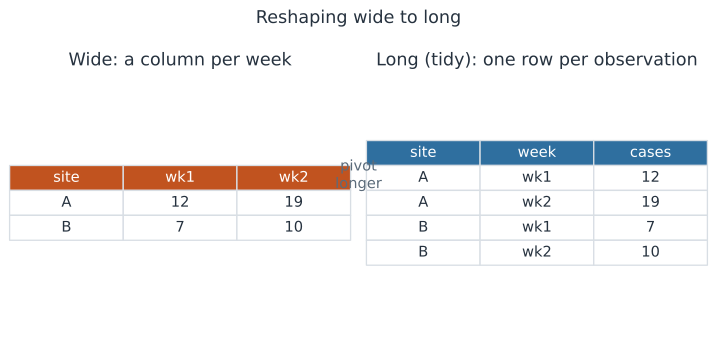
A table with one column per week breaks all three rules at once: week is a variable smeared across column names, and each row holds several observations.
See Manipulating Data Frames for the verbs that operate on tidy tables.
Wide versus long#
The same data can be stored wide (a column per week) or long (a week column and a cases column).
Neither is always right, but they serve different ends.
- Long is tidy and is what plotting and modeling tools expect; group-by and faceting fall out naturally.
- Wide is compact for human reading and is the natural input for a correlation matrix or a paired comparison.
The skill is moving between them on demand rather than committing to one.
Pivoting#
Reshaping long-to-wide and back is pivoting.
- Longer (
pivot_longerin tidyr,unpivotin polars,meltin pandas) gathers a set of columns into two — a name column and a value column. - Wider (
pivot_wider,pivot) spreads a name/value pair back out into columns.
Reach for longer when column names are actually the values of a variable, and for wider when you need one row per unit with named measurements side by side.
Relational data and joins#
Rather than one giant table with everything repeated, keep separate tidy tables and link them by a shared key. A join combines rows from two tables where their keys match.
- An inner join keeps only keys present in both tables.
- A left join keeps every row of the left table, filling unmatched right-hand columns with nulls.
- An anti join keeps left rows whose key is absent from the right table, which is how you find the orphans — samples with no recorded site, say.
The key is the contract between tables, so it must be unique in the table it identifies and consistent in type across both sides. This is the same model behind SQL and behind Data Representation and Formats.
Why normalized tables reduce errors#
If a site’s name lives in one row of a sites table, you correct a typo once.
If it is copied beside every one of that site’s samples, you must find and fix every copy, and the day you miss one the table quietly disagrees with itself.
Keeping each fact in exactly one place — normalization — is what makes relational tables less error-prone than one wide spreadsheet, and it is why data arriving from an API often comes pre-split into linked tables, as in Data Ingestion and APIs.
A worked example#
Start with a wide table of weekly case counts, one column per week, two sites.
Reshaping it longer gives one row per site-week, which is tidy.
Then join a small sites lookup table on the site key to attach each site’s region, so a downstream group-by can aggregate cases by region.
The steps below build the wide table, unpivot it, and join the lookup.
In code#
The same reshape-then-join in each ecosystem.
Python#
import polars as pl

wide = pl.DataFrame(
    {"site": ["A", "B"], "wk1": [12, 7], "wk2": [19, 10]}
)
long = wide.unpivot(
    index="site", on=["wk1", "wk2"],
    variable_name="week", value_name="cases",
)

sites = pl.DataFrame(
    {"site": ["A", "B"], "region": ["north", "south"]}
)
joined = long.join(sites, on="site", how="inner")

print("wide shape:", wide.shape)
print("long shape:", long.shape)
print("joined shape:", joined.shape)
print(joined.sort(["site", "week"]).head(4))
wide shape: (2, 3)
long shape: (4, 3)
joined shape: (4, 4)
shape: (4, 4)
┌──────┬──────┬───────┬────────┐
│ site ┆ week ┆ cases ┆ region │
│ ---  ┆ ---  ┆ ---   ┆ ---    │
│ str  ┆ str  ┆ i64   ┆ str    │
╞══════╪══════╪═══════╪════════╡
│ A    ┆ wk1  ┆ 12    ┆ north  │
│ A    ┆ wk2  ┆ 19    ┆ north  │
│ B    ┆ wk1  ┆ 7     ┆ south  │
│ B    ┆ wk2  ┆ 10    ┆ south  │
└──────┴──────┴───────┴────────┘
R#
library(data.table)
wide <- data.table(site = c("A", "B"), wk1 = c(12, 7), wk2 = c(19, 10))

# wide -> long
long <- melt(wide, id.vars = "site",
             variable.name = "week", value.name = "cases")

sites <- data.table(site = c("A", "B"), region = c("north", "south"))
joined <- sites[long, on = "site"]   # left join of long onto sites
joined[order(site, week)]
Julia#
using DataFrames

wide = DataFrame(site = ["A", "B"], wk1 = [12, 7], wk2 = [19, 10])
long = stack(wide, [:wk1, :wk2],
             variable_name = :week, value_name = :cases)

sites = DataFrame(site = ["A", "B"], region = ["north", "south"])
joined = innerjoin(long, sites, on = :site)
sort(joined, [:site, :week])
Why it matters#
Surveillance and lab data almost always arrive wide — a column per date, a column per assay — because that is convenient for the person typing it in. Reshaping to long and joining on stable keys is the routine, unglamorous step that lets every later tool work without special cases, and it is where silent errors either get designed out or baked in. Get the shape right once and the plot, the model, and the summary all follow.