Graphing Data
A good graph is often the whole analysis: the right picture reveals structure — a skew, an outlier, a turning epidemic — that tables and summary statistics hide. This page is about choosing the right chart and drawing it honestly, with the grammar-of-graphics tools in R, Python, and Julia.
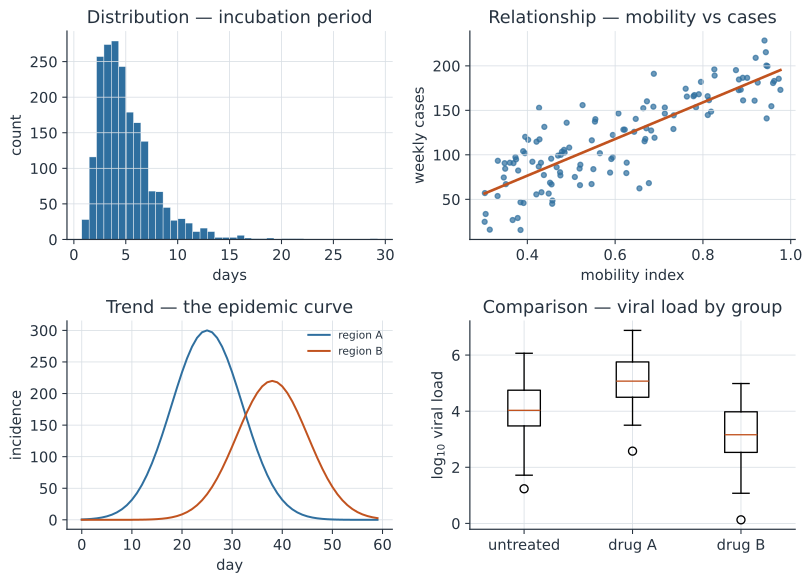
Match the chart to the question#
The chart should follow from what you are asking, not from habit.
- Distribution of one variable — histogram, density plot, or boxplot/violin (e.g. the right-skewed incubation-period distribution).
- Relationship between two variables — a scatter plot, often with a fitted trend (cases vs mobility, dose vs response).
- Trend over time — a line, the epidemic curve being the canonical example.
- Comparison across groups — bars or (better) points with intervals, or small multiples; boxplots to compare whole distributions.
- Composition — stacked areas or bars; avoid pie charts, which make comparison hard.
Principles of honest graphics#
- Show the data, not only summaries — overlay the raw points on top of means or boxes when you can.
- Don’t distort the axes: start bar charts at zero, and be wary of dual y-axes, which invite spurious “correlations.”
- Facet (small multiples): many small panels beat one crowded chart when comparing groups.
- Direct-label series instead of forcing the reader to a legend where practical.
- Choose color for everyone: use colorblind-safe palettes and don’t rely on color alone to carry meaning.
- Use a log scale for multiplicative or exponential data — early epidemic growth is a straight line on a log axis, which makes changes in growth rate visible.
The grammar of graphics#
The most productive plotting tools describe a chart as layers: a dataset, a mapping from variables to visual channels (aesthetics — position, color, size), and geometric marks (geoms). Learn one grammar and the others feel familiar.
- R — ggplot2 is the reference implementation of the layered grammar.
- Python — matplotlib (imperative, ubiquitous — every figure on this site is drawn with it), plotnine (ggplot2’s grammar), and plotly for interactivity.
- Julia — Makie (fast, publication-quality), Plots.jl, and AlgebraOfGraphics.jl (a grammar of graphics on Makie).
In code#
The same epidemic curve in each ecosystem.
R — ggplot2#
library(ggplot2)
df <- data.frame(day = 0:59,
                 cases = round(300 * exp(-((0:59 - 25) / 10)^2)))
ggplot(df, aes(day, cases)) +
  geom_col(fill = "#2f6f9f") +
  labs(title = "Epidemic curve", x = "day", y = "incident cases") +
  theme_minimal()
Python — matplotlib#
import numpy as np
import matplotlib.pyplot as plt

day = np.arange(60)
cases = 300 * np.exp(-((day - 25) / 10) ** 2)
fig, ax = plt.subplots()
ax.bar(day, cases, color="#2f6f9f")
ax.set(title="Epidemic curve", xlabel="day", ylabel="incident cases")
fig.savefig("epi_curve.svg")     # or plt.show()
Julia — Plots.jl#
using Plots
day = 0:59
cases = @. 300 * exp(-((day - 25) / 10)^2)
bar(day, cases, xlabel = "day", ylabel = "incident cases",
    title = "Epidemic curve", legend = false)
Why it matters#
Graphing is where analysis meets communication: it is the fastest way to explore data (spotting the outlier, the skew, the second wave) and the most honest way to present a result. The figures throughout this site — from the logistic curve to the Simpson’s-paradox scatter — exist because a picture makes the idea land.