Note-Taking with Org Mode
Org mode is a plain-text outliner, task manager, and literate-programming environment built into Emacs.
For a researcher it doubles as a lab notebook: one .org file can hold your outline, to-dos, links, tables, and runnable code, then export to a PDF or slides — all in version-controllable plain text.
Why plain-text notes#
- Everything is a
.orgtext file: greppable, diffable, and safe under version control, with no proprietary lock-in. - One format spans outlines, tasks, references, data tables, and analysis code, so your thinking and your work live together.
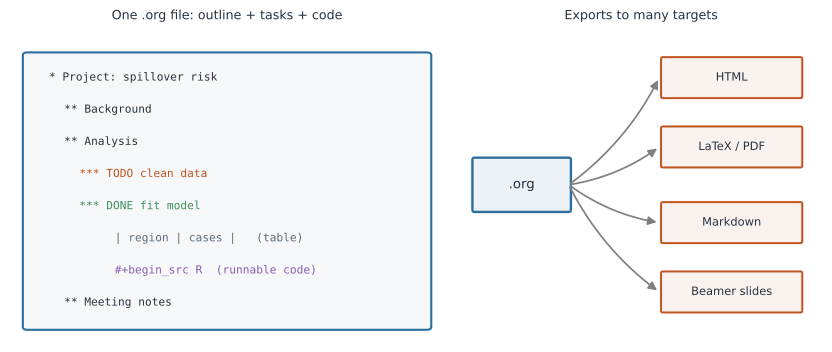
- It exports to HTML, LaTeX/PDF, Markdown, and Beamer slides, so the same notes become a report or a talk (Figure 1).
Outlining#
Structure is just headlines marked with asterisks; depth is the number of stars.
* Project: spillover risk
** Background
** Analysis
*** Data cleaning
*** Model fit
** Meeting notes
Press TAB on a headline to fold or unfold its subtree, and S-TAB to cycle the whole document between overview, contents, and full detail.
M-<up>/M-<down> move a subtree, and M-<left>/M-<right> promote or demote it — so reorganizing a document is a few keystrokes, not cut-and-paste.
Tasks, tags, and the agenda#
Any headline becomes a task by giving it a keyword; C-c C-t cycles TODO → DONE.
Add :tags:, priorities, and timestamps to make notes actionable.
** TODO Refit model with waning immunity :analysis:urgent:
   DEADLINE: <2026-07-10 Fri>
** DONE Send draft to co-authors
   CLOSED: [2026-07-02 Thu]
C-c c (org-capture) drops a quick note or task into an inbox from anywhere without losing your place, and C-c a (the agenda) collects deadlines and scheduled items across all your files into one calendar view.
Links, tables, and citations#
Link to a URL, a file, or another headline with C-c C-l; the syntax is [[target][description]].
Tables are just text with | separators — press TAB and Org auto-aligns the columns, and it even supports spreadsheet-style formulas.
See [[https://doi.org/10.1038/nature02104][Antia et al. 2003]] and [[file:notes.org::*Model fit][the model section]].

| strain    | R0  | note         |
|-----------+-----+--------------|
| wildtype  | 0.9 | subcritical  |
| mutant    | 1.5 | supercritical|
Literate notebooks with Babel#
Org’s killer feature for analysis is Babel: embed source blocks in many languages, execute them in place with C-c C-c, and capture the results in the document.
This makes a .org file a language-agnostic, reproducible notebook (see reproducibility).
#+begin_src R :results output
  set.seed(1)
  mean(rnorm(1000))
#+end_src
Because prose, code, and output share one file, you can weave a full analysis — much like R Markdown or Jupyter — and the same math notation you would use in LaTeX renders on export.
Exporting#
C-c C-e opens the export dispatcher: choose HTML, LaTeX → PDF, Markdown, or Beamer slides from the same source.
Your notes, a manuscript, and a talk can all come from one file, which keeps them in sync.
A Zettelkasten with org-roam#
For interlinked, atomic notes, org-roam adds a lightweight Zettelkasten on top of Org: each note is a file, notes link to each other, and a backlinks buffer shows everything that points at the current note. It is an excellent way to grow a personal knowledge base of papers, methods, and ideas over a whole program.
Creating and navigating notes#
Where a note lives matters as much as what it says, and a useful split is:
- Project notes — an
analysis.orgornotes.orgkept inside the project’s own directory, tracked by Git next to the code and data it documents. This is the right home for a lab notebook, analysis decisions, and to-dos scoped to one study, because the notes then travel and version with the project. - A central knowledge base — a single
~/orgdirectory (Org’sorg-directory) or an org-roam store for cross-project notes: papers, methods, and ideas you reuse everywhere. - An inbox — one
inbox.orgthat quick captures land in, to be sorted (refiled) later.
Create a note in a specific place#
To create a project-specific file, just open it by path and Emacs writes it on first save.
- Vanilla:
C-x C-f(find-file), then type the path — e.g.~/projects/flu/notes.org— and start writing. - Doom:
SPC .opens find-file in the current directory, so when you are already visiting a file in the project, typingnotes.orgcreates it right there;SPC f ffinds from anywhere andSPC f Ffrom the current file’s folder.
Because you are only naming a path, “put this note in this project” and “put it in my central notes” are the same action aimed at different directories — the file system, not a hidden app database, decides where a note lives.
Route captures to the right file#
org-capture (C-c c, or Doom SPC X) writes a note without first navigating to a file; capture templates decide where each kind of note is filed.
Point different templates at different targets — a project’s TODO list, a central inbox, a journal:
(setq org-capture-templates
      '(("t" "Project todo" entry
         (file+headline "~/projects/flu/notes.org" "Tasks")
         "* TODO %?\n  %U")
        ("i" "Inbox note" entry
         (file+headline "~/org/inbox.org" "Inbox")
         "* %?\n  %U %a")))   ; %a links back to where capture was invoked
Find and move between notes#
- Within a file:
C-c C-j(org-goto), or DoomSPC s i(imenu), jumps to any headline;TABfolds a subtree. - Across a project: Doom
SPC p f(projectile) lists every file in the current project, sonotes.orgis one keystroke from the code. - Across your knowledge base: Doom
SPC n fbrowsesorg-directory; with org-roam,SPC n r ffinds a node by title andSPC n r rtoggles the backlinks buffer to see what points here. - Reorganize:
C-c C-w(DoomSPC m r) refiles the current subtree into another file or heading — the clean way to move an inbox note into its project.
Getting started#
- With vanilla Emacs, Org is already included — open any
.orgfile and start typing. - The fastest fully-featured setup is Doom Emacs: enable its
orgmodule (andorg-roam) and you get sensible defaults plus Vim keybindings. - Keep the official manual and the community wiki, Worg, handy as references.
Cheat sheet: vanilla Emacs#
The classic C-c (Control-c) bindings work in any Emacs, and still work inside Doom.
| Keys | Action |
|---|---|
TAB | fold / unfold the current subtree |
S-TAB | cycle global folding |
C-c C-t | cycle TODO state |
C-c C-j | jump to a headline in this file |
C-c C-l | insert or edit a link |
C-c C-w | refile the subtree elsewhere |
C-c c | capture a quick note or task |
C-c a | open the agenda |
C-c C-c | execute a code block / act on context |
C-c C-e | export dispatcher |
Cheat sheet: Doom Emacs#
Doom layers a discoverable, SPC-leader (spacebar) scheme on top; SPC m is the local leader for Org-specific commands.
The bindings below are Doom defaults — search them live with SPC h b b (search keybindings) or SPC h d h (Doom help), since they can vary by version and enabled modules.
| Keys | Action |
|---|---|
SPC . | find file in the current directory (create one here) |
SPC f f | find any file · SPC f F from this folder |
SPC p f | find a file in the current project |
SPC X | capture a note (org-capture) |
SPC n f | browse notes in your org-directory |
SPC n r f | find an org-roam node · SPC n r i insert a link |
SPC n r r | toggle the org-roam backlinks buffer |
SPC n j | open the journal / daily note |
SPC s i | jump to a headline (imenu) |
SPC m t | set the TODO state |
SPC m r | refile the current subtree |
SPC m l l | insert a link |
SPC m d d | set a deadline · SPC m d s schedule |
SPC m e | export dispatcher |
SPC m ' | edit a source block in its own buffer |