Reproducibility
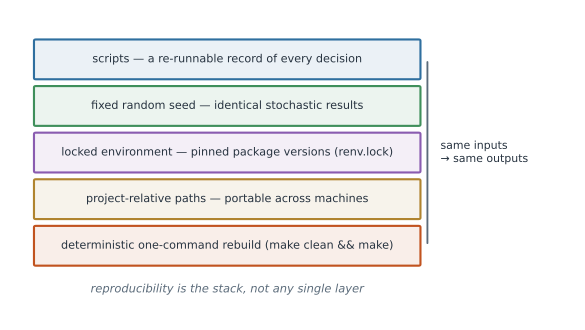
An analysis is reproducible if someone else — or you, later — can re-run it and get the same answer. Reproducibility is not an extra chore at the end; it is a set of small habits that also make your work easier to debug and trust (Figure 1).
Scripts beat point-and-click#
A menu click leaves no trace. A script is the record: it documents exactly what you did and lets you re-run it instantly when the data updates or a reviewer asks a question. If you find yourself clicking through a GUI to transform data, write the code instead.
- Point-and-click: fast once, impossible to reproduce, error-prone to repeat.
- Scripted: a permanent, re-runnable record of every decision.
Set random seeds#
Anything that uses randomness — simulation, bootstrap, cross-validation splits, MCMC — must be seeded so the “random” results are identical on every run.
set.seed(20260702)
x <- rnorm(1000)
import numpy as np
rng = np.random.default_rng(20260702)   # preferred: an explicit generator
x = rng.normal(size=1000)
using Random
rng = MersenneTwister(20260702)
x = randn(rng, 1000)
Seed once at the top of a script (or pass an explicit generator through your functions). Report the seed in your writeup so others can reproduce the exact figures.
Record your environment#
Same code + different package versions can give different answers. Capture what you ran with.
R — snapshot the session, and use renv to lock and restore versions:
sessionInfo()          # human-readable record of R and package versions

renv::init()           # start tracking this project's packages
renv::snapshot()       # write renv.lock with exact versions
renv::restore()        # reinstall those exact versions elsewhere
Python — pin dependencies with a virtual environment:
python -m venv .venv && source .venv/bin/activate
pip install numpy scipy pandas
pip freeze > requirements.txt      # exact versions
# elsewhere:
pip install -r requirements.txt
# or with conda:
conda env export > environment.yml
Julia — the built-in package manager tracks everything in two files:
using Pkg
Pkg.activate(".")      # project-local environment
Pkg.add("Distributions")
Pkg.instantiate()      # reproduce from Project.toml + Manifest.toml
Commit renv.lock, requirements.txt/environment.yml, and Project.toml/Manifest.toml to version control alongside your code.
Literate programming#
Interleave prose, code, and output in one document so the narrative and the numbers can never drift apart. Regenerate the whole report from source in one step.
- R: R Markdown or Quarto (
quarto render report.qmd). - Python / Julia / R: Jupyter notebooks, or Quarto, which supports all three.
The key win: figures and tables are computed from the code in the document, not pasted in by hand.
Relative paths and deterministic pipelines#
- Use project-relative paths (see Project Workflow) so the code runs on any machine.
- Make the pipeline deterministic end to end: the same inputs always yield the same outputs.
Avoid hidden state — don’t rely on variables lingering in your session, and prefer
Rscript/python script.pyover an interactive console for the final run.
# GOOD: reproduce the whole analysis from a clean state
make clean && make