Plain Text and File Systems
Almost everything you make in a research project is a file, and almost everything durable is a text file. Where your work lives, how the machine finds it, and whether another machine can read it in ten years all come down to two ideas: plain text and the file system. This page is about both, and about writing paths that keep working when the project moves.
Why plain text#
A plain-text file is just characters, readable by any editor on any operating system, now and decades from now. That transparency is why it is the substrate for reproducible work.
- It is diff-able: version control can show you exactly which lines changed, so review and history work — see Version Control with Git.
- It is tool-agnostic:
grep, an editor, a script, and a language all read the same bytes with no special reader. - It is durable: an opaque binary format depends on the program that wrote it, and when that program is gone the data can become unreadable.
Reserve binary formats for what genuinely needs them — large numeric arrays, images — and keep code, configuration, and small tables as text. More on the formats you will meet lives in Data Representation and Formats.
Encodings and line endings#
A text file is a sequence of bytes, and an encoding is the rulebook mapping bytes to characters. Default to UTF-8 everywhere; it covers every language and symbol, and mixing encodings is how an accented name turns into garbage.
Line endings differ by operating system: Unix and macOS end a line with \n, Windows with \r\n.
The mismatch shows up as a stray ^M at line ends or a file that looks like one long line.
Configure your editor and Git to normalize line endings so the difference never reaches a diff.
The file system as a tree#
A file system is a tree: directories contain files and other directories, rooted at a single top.
Every file has a path, the sequence of directories from the root down to it.
Path separators differ across systems — / on Unix and macOS, \ on Windows — which is one reason you never build a path by pasting strings together.
Absolute versus relative paths#
An absolute path names a file from the root (/home/ada/project/data/raw/cases.csv); it is unambiguous but tied to one machine.
A relative path names a file from the current working directory (data/raw/cases.csv); it is portable, because it moves with the project.
The rule that makes a project reproducible: use relative paths inside the project, resolved against the project root, and never hard-code an absolute path like /Users/you/Desktop/... that exists on exactly one computer.
Set the working directory to the project root once — an RStudio project or an .Rproj, a here::here() call, or launching from the root — and every relative path resolves the same way on every machine.
Organizing a project directory#
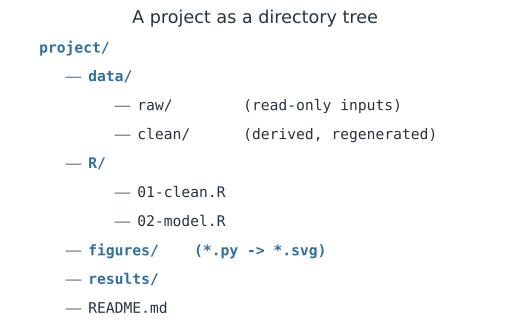
A predictable layout lets a collaborator, or you next year, find things without asking.
data/raw/holds inputs, kept read-only;data/clean/holds derived data you can regenerate.- Code lives in its own folder (
R/,src/), outputs in another (figures/,results/). - A
README.mdat the root says what the project is and how to run it.
Because raw data is read-only and clean data is regenerated, the pipeline can always rebuild everything downstream from the inputs plus the code.
Globbing#
Globbing matches sets of paths with wildcards, so you can act on many files at once.
*matches any run of characters within a name:data/raw/*.csv.?matches a single character.**matches across directories in many tools:data/**/*.csv.
Globbing is how a script picks up “every CSV in raw/” without you listing them, which keeps the pipeline correct as files are added.
A worked example#
Say the project root is /home/ada/flu-2024 on your laptop and /scratch/ada/flu-2024 on a cluster.
Store the relative path data/raw/cases.csv and resolve it against whichever root the machine provides, and the same code reads the right file in both places.
The steps below construct example paths and take them apart — joining a root to a relative path, finding a parent, reading a suffix, and recovering the relative path from an absolute one — all without touching the real file system.
In code#
Manipulate paths with a path library, never string concatenation.
Python#
from pathlib import PurePosixPath

root = PurePosixPath("/home/ada/flu-2024")
rel = PurePosixPath("data/raw/cases.csv")

full = root / rel                       # join
print("full:     ", full)
print("parent:   ", full.parent)
print("name:     ", full.name)
print("suffix:   ", full.suffix)
print("relative: ", full.relative_to(root))

# Same relative path against a different root -> portable.
cluster = PurePosixPath("/scratch/ada/flu-2024")
print("on cluster:", cluster / rel)
full:      /home/ada/flu-2024/data/raw/cases.csv
parent:    /home/ada/flu-2024/data/raw
name:      cases.csv
suffix:    .csv
relative:  data/raw/cases.csv
on cluster: /scratch/ada/flu-2024/data/raw/cases.csv
R#
# fs and here keep paths portable; never paste with "/"
library(fs)
root <- "/home/ada/flu-2024"
full <- path(root, "data", "raw", "cases.csv")
path_dir(full)     # parent directory
path_ext(full)     # "csv"
path_rel(full, start = root)   # relative to the root
Julia#
root = "/home/ada/flu-2024"
full = joinpath(root, "data", "raw", "cases.csv")
dirname(full)                 # parent directory
last(splitext(full))          # ".csv"
relpath(full, root)           # relative to the root
Why it matters#
A shared analysis breaks most often not in the model but at the boundary — a path that only exists on one laptop, a file saved in the wrong encoding, a Windows line ending that trips a parser. Keeping work in plain text and addressing files with relative paths against a known root is what lets a pipeline run unchanged on a colleague’s machine or a cluster. It is the quiet infrastructure that makes everything else reproducible.