Vectorization, Memory & Profiling
Once your code is correct and its algorithmic complexity is reasonable, the next question is constant-factor speed: two programs that are both O(n) can differ by 100× in wall-clock time.
That gap comes down to how well the code works with the machine — using fast bulk operations instead of slow element-by-element ones, and keeping data in fast memory instead of waiting on slow memory.
The golden rule underneath all of it: measure first. Optimize the part that is actually slow, not the part you guess is slow.
Vectorize: Operate on Whole Arrays#
In interpreted languages, a hand-written loop pays interpreter overhead on every iteration. A vectorized operation hands the whole array to fast, pre-compiled code that does the loop in one call — the same math, a fraction of the time.
import numpy as np
rng = np.random.default_rng(0)
x = rng.random(1_000_000)

total = 0.0
for v in x:              # slow: a Python-level loop, 1,000,000 iterations
    total += v * v

vec = np.sum(x * x)      # fast: one vectorized call, same result

print("loop and vectorized agree:", np.isclose(total, vec))
print(f"sum of squares: {vec:.4f}")
loop and vectorized agree: True
sum of squares: 333560.6157
The two give the same answer, but on a million elements the vectorized version is typically tens to hundreds of times faster. The same principle holds across languages — with one important twist:
# R: loops are slow; prefer vectorized ops and the apply/map family
total <- sum(x^2)                 # vectorized -- fast
# avoid: for (v in x) total <- total + v^2
# Python: use numpy / pandas / polars operations, not element loops
vec = np.sum(x**2)
# Julia: compiled, so loops are already FAST -- a hand-written loop here
# is idiomatic and as quick as the vectorized form. Broadcasting with .
total = sum(xi^2 for xi in x)     # fast; or sum(x.^2)
That twist matters for a multi-language group: “always vectorize, never loop” is advice for R and Python, not Julia. Julia compiles your loops, so an explicit loop is often the clearest and fastest option there.
Why Memory Layout Matters#
Even vectorized code can be throttled by memory. The CPU is fast, but fetching data from main memory is comparatively glacial, so processors keep small, fast caches of recently-used data nearby. Code that reads data in the order it is laid out in memory stays in cache and flies; code that jumps around waits on slow memory.
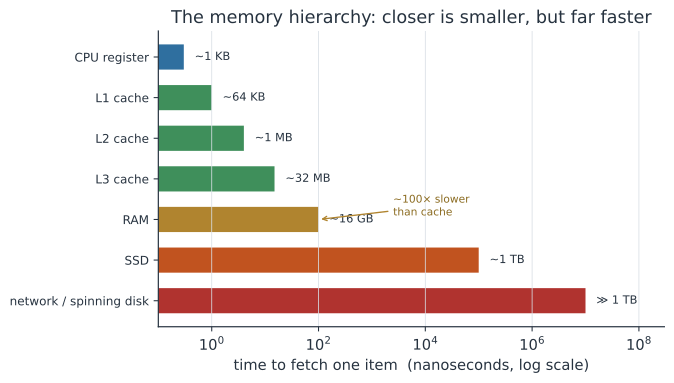
The practical consequence is traverse arrays along the way they are stored. R, Julia, and Fortran are column-major (consecutive elements of a column are adjacent in memory); C, Python, and NumPy (by default) are row-major. Looping down columns in R but across rows in a row-major array — or vice versa — can be several times slower purely from cache misses, even though the arithmetic is identical.
Don’t Make Needless Copies#
The other memory trap is silently copying large objects.
- Growing an object in a loop re-allocates it every time — an accidental
O(n²)cost. Pre-allocate the result to its final size and fill it in. - R copies on modification. Changing one element of a large vector or data frame can duplicate the whole thing;
data.tableand in-place idioms exist precisely to avoid this. - Know views vs. copies. A NumPy slice is a view (no copy); a fancy-index is a copy. Copying a multi-gigabyte array you meant to modify in place can quietly blow your memory budget.
# SLOW: the vector is re-allocated on every iteration -> O(n^2)
out <- c()
for (i in 1:n) out <- c(out, f(i))

# FAST: pre-allocate once, then fill
out <- numeric(n)
for (i in 1:n) out[i] <- f(i)
Profile Before You Optimize#
Programmer intuition about where time goes is famously wrong. Almost always, a large majority of the time is spent in a small fraction of the code — so the winning move is to profile: measure where the time actually goes, fix the top offender, and re-measure.
Every language has the tools:
| Task | R | Python | Julia |
|---|---|---|---|
| Time one expression | bench::mark(), system.time() | %timeit (IPython) | @btime (BenchmarkTools) |
| Profile a whole script | Rprof(), profvis | cProfile, py-spy, line_profiler | @profile, ProfileView |
Do let a profiler point you at the real bottleneck, then optimize that. Don’t rewrite code for speed on a hunch — you will usually spend effort where it does not matter, and trade away clarity for nothing. And don’t optimize at all until the code is correct and reproducible: a fast wrong answer is still wrong.
A Short Checklist#
- Vectorize in R and Python (array ops,
numpy/pandas/polars); in Julia, a plain loop is already fast. - Traverse arrays in memory order (column-major in R/Julia, row-major in NumPy).
- Pre-allocate; never grow a vector or data frame inside a loop.
- Avoid needless copies of large objects; know when you have a view vs. a copy.
- Profile, then optimize the top offender — and only after the code is correct.
Related#
- Big-O Notation & Computational Complexity — the algorithmic speed that comes before constant factors
- Data Structures & Choosing the Right Container — the other big constant-factor lever
- Parallelism & Concurrency — the next step when one core isn’t enough
- A Simulation Toolkit — hot inner loops where this pays off
- Running Jobs on an HPC Cluster (SLURM) — memory limits and big-data runs
- Programming & Computing