Big-O Notation & Computational Complexity
Some analyses finish in a blink; others crawl, or never finish at all. The difference is usually not the speed of your computer but how the work grows as the data grows. Big-O notation is the language computer scientists use to describe that growth, and it is one of the most useful ideas you can borrow from computer science even if you never write “real” software.
You do not need any of the formal machinery to get the payoff. The whole idea can be summarized as one practical question:
If I double the amount of data, how much longer does my code take?
A little more? Twice as long? Four times? A million times? Big-O is just a vocabulary for those answers.
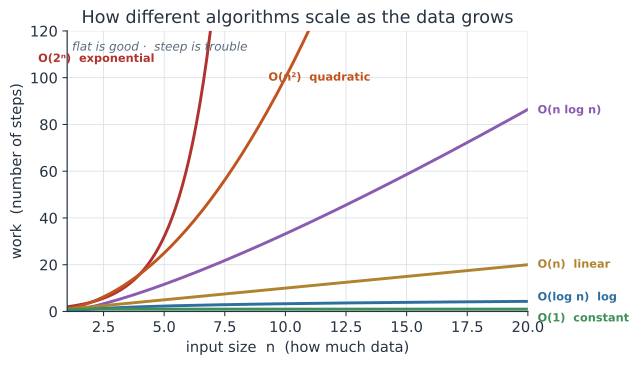
What Big-O Actually Measures#
Big-O describes the shape of the growth, not the exact time. It deliberately throws away two things that depend on your machine and your mood:
- Constant factors. Code that takes
3nsteps and code that takes100nsteps are bothO(n)— they grow at the same rate, just with different slopes. A faster laptop changes the constant, not the shape. - Small inputs. Big-O is about what happens as
ngets large, because that is where the pain lives. On ten data points everything is instant; the question is what happens at ten million.
Think of it like population growth in biology. Whether a bacterial culture doubles every 20 or every 30 minutes is a constant factor; the fact that it grows exponentially is the shape, and the shape is what determines whether you have a colony or a catastrophe by morning. Big-O is the growth model for your code’s running time.
Here n is the size of the input — the number of sequences, samples, patients, rows, sites, or simulation replicates.
The One Question: The Doubling Test#
The fastest way to build intuition is to ask what happens when the data doubles. Each complexity class gives a different answer, and the answer is what the notation is really telling you.
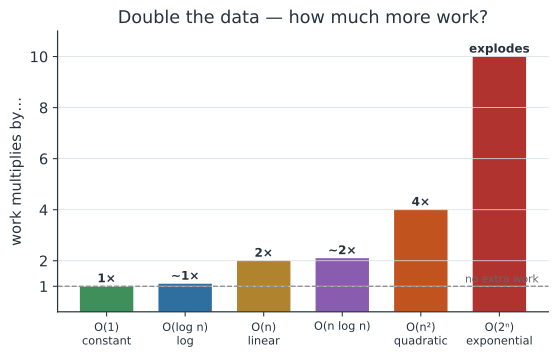
O(1)constant — same work no matter what. Looking up one value in a table.O(log n)logarithmic — barely grows; doubling the data adds one step. Binary search in a sorted list.O(n)linear — double the data, double the work. Reading every row once.O(n log n)linearithmic — the “good” sorting speed; a hair worse than linear.O(n²)quadratic — double the data, quadruple the work. Comparing every item to every other item.O(2ⁿ)exponential — adding a single data point doubles the work. Trying every possible combination.
The jump from O(n) to O(n²) is the one that bites working scientists most often, so it is worth recognizing on sight.
A Field Guide to the Common Classes#
| Complexity | Name | Doubling n… | Everyday / biology example |
|---|---|---|---|
O(1) | constant | no change | Grab element x[i]; check if a number is even |
O(log n) | logarithmic | +1 step | Binary search in a sorted gene list; lookup in a balanced tree |
O(n) | linear | ×2 | Sum a column; scan reads once; filter a data frame |
O(n log n) | linearithmic | a bit more than ×2 | Sorting; the fastest general-purpose sort |
O(n²) | quadratic | ×4 | Every-pair contact in an individual-based model; all-vs-all sequence comparison; a pairwise distance matrix |
O(n³) | cubic | ×8 | Naïve matrix multiplication; some dynamic-programming alignments |
O(2ⁿ) | exponential | ×2 per point | Trying every subset of n features; brute-force phylogenetic tree search |
O(n!) | factorial | catastrophic | Every ordering of n items; the brute-force travelling-salesman route |
The bottom two rows are why some problems are intractable by brute force: at O(2ⁿ), just 60 data points require more operations than there are seconds in the age of the universe.
This is exactly why phylogenetics, protein folding, and network problems rely on clever heuristics rather than checking every possibility.
Spotting Complexity in Your Own Code#
You can usually read the complexity straight off the structure of the code.
The rule of thumb: each nested loop over the data multiplies in another factor of n.
O(n) — one loop over the data. Touch each element once.
# R: total up a vector of case counts -- one pass
total <- 0
for (x in cases) {
  total <- total + x          # runs n times
}
O(n²) — a loop inside a loop. Every element meets every other element.
This is the classic accidental slowdown: an all-pairs comparison, a distance matrix, or “for each sample, look through all the other samples.”
# Python: compute all pairwise differences -- n * n = n^2 steps
diffs = []
for a in samples:            # runs n times
    for b in samples:        # ...and n times again, for each a
        diffs.append(abs(a - b))
O(log n) — repeatedly halve the search space. Binary search only works on sorted data, but it is astonishingly fast: a million sorted items are searched in ~20 steps.
# Python: binary search -- throw away half the list each step
def binary_search(sorted_x, target):
    lo, hi = 0, len(sorted_x) - 1
    while lo <= hi:
        mid = (lo + hi) // 2
        if sorted_x[mid] == target:
            return mid
        elif sorted_x[mid] < target:
            lo = mid + 1         # target is in the top half
        else:
            hi = mid - 1         # target is in the bottom half
    return -1
O(n log n) — sort, then walk. Sorting is the workhorse of fast algorithms: many problems that look O(n²) become O(n log n) if you sort the data first and then make a single linear pass.
A Population-Biology Example: Individual-Based Models#
The O(n²) trap shows up constantly in ecology and epidemiology through individual-based (agent-based) models.
Suppose you simulate an epidemic in a population of N individuals, and at each timestep you let the infection spread through contact.
The tempting way to write it is “for each infectious individual, check every other individual”:
# O(N^2) PER TIMESTEP: every individual can contact every other one
for i in population:
    for j in population:            # N * N pairs, every single step
        if infectious(i) and susceptible(j) and contact(i, j):
            maybe_infect(j)
That inner loop makes each timestep O(N²), and a full run of T timesteps costs O(T · N²).
This is fine for a village of 500, but for a city of 100,000 each timestep checks ten billion pairs — the same model that ran in seconds now runs for days.
The fix mirrors the biology.
Real individuals do not mix with the entire population every day; they contact a limited number of others.
If each individual only interacts with its k neighbours (on a spatial grid, or along a contact network), each timestep drops to O(N · k) — effectively O(N) when k is small and fixed.
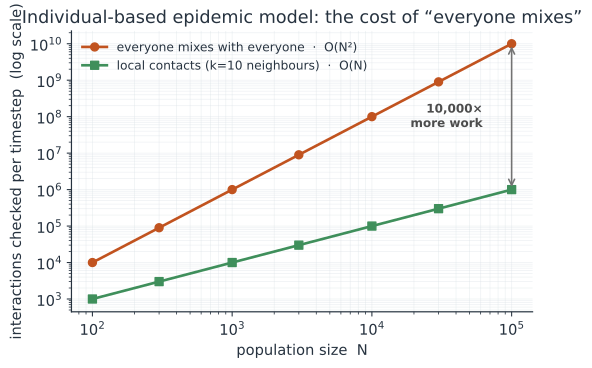
This is why large ecological and epidemic simulations lean on spatial structure, contact networks, or compartmental (mean-field) models: each is a way of escaping the all-pairs O(N²) cost.
The same reasoning applies to a pairwise distance matrix between N sampled sequences, all-vs-all BLAST, or computing every pairwise relatedness in a population — all O(N²) in both time and memory.
Measuring Complexity by Simulation#
You do not have to derive the complexity of a piece of code — you can measure it, which is a small simulation study in itself and a good habit from reproducible computing. Run the code on inputs of growing size, record how long each takes, and look at the shape.
The trick is to plot time against n on log-log axes.
A power law becomes a straight line whose slope is the exponent k: a single loop gives a slope near 1 (O(n)), and an all-pairs double loop gives a slope near 2 (O(n²)).
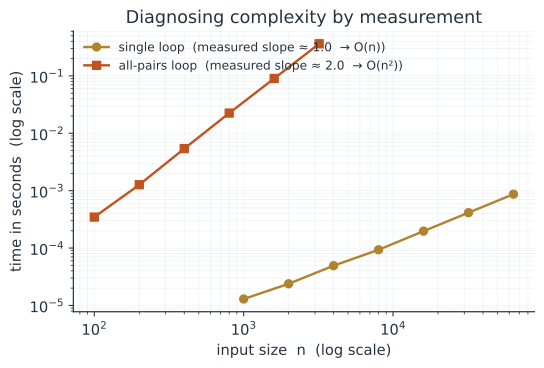
You can see the same signature without a clock by simply counting operations. Here we count the basic steps each approach takes and watch what the doubling test predicts actually happen:
def linear_ops(n):
    """One pass: n steps."""
    ops = 0
    for _ in range(n):
        ops += 1
    return ops

def quadratic_ops(n):
    """All pairs: n * n steps."""
    ops = 0
    for _ in range(n):
        for _ in range(n):
            ops += 1
    return ops

print(f"{'n':>5} | {'O(n) steps':>11} | {'O(n^2) steps':>13}")
print("-" * 35)
for n in [10, 20, 40, 80, 160]:
    print(f"{n:>5} | {linear_ops(n):>11,} | {quadratic_ops(n):>13,}")
    n |  O(n) steps |  O(n^2) steps
-----------------------------------
   10 |          10 |           100
   20 |          20 |           400
   40 |          40 |         1,600
   80 |          80 |         6,400
  160 |         160 |        25,600
Every time n doubles, the O(n) column doubles while the O(n²) column quadruples — exactly the doubling test made concrete.
Why This Matters for Your Research#
- Recognize the
O(n²)trap. A double loop over your samples is fine for 100 samples (10,000 steps) and painful for 100,000 (ten billion steps). When a script that flew on test data crawls on the real dataset, an accidental nested loop is the usual culprit. - Prefer vectorized / built-in operations. In R, Python, and Julia the library functions (
colSums,numpy,pandas, sorting, hash-based lookups) are implemented in fast compiled code with good complexity. Reaching for an explicit nested loop is often how you create anO(n²)problem — see A Simulation Toolkit. - Sort, then scan. If you find yourself searching a list over and over, sort it once (
O(n log n)) and use binary search (O(log n)) instead of scanning it every time (O(n)per lookup,O(n²)overall). - Know when to stop optimizing. Big-O is about scaling, not small jobs.
If your analysis runs once on 500 rows, do not spend a day shaving an
O(n²)down toO(n log n)— clarity wins. Save the effort for the code that runs on the big data or inside a tight simulation loop.
A Note on Memory#
Complexity applies to space (memory) as well as time.
An O(n²) time algorithm that also builds an O(n²) object — like a full pairwise distance matrix for n samples — can exhaust your computer’s memory long before it runs out of patience.
For 100,000 samples that matrix has ten billion entries; storing it is often the real barrier, and the reason such work moves to an HPC cluster.
Related#
- A Simulation Toolkit — where measuring runtime and avoiding
O(n²)loops pays off - Good Programming Practices — writing clear code before fast code
- Running Jobs on an HPC Cluster (SLURM) — when the work genuinely is too big for one machine
- Reproducibility — measuring and recording performance honestly
- Computer Basics for Scientists — hardware, memory, and what makes code slow
- Programming & Computing