LaTeX and Technical Documents
LaTeX is a typesetting system that turns plain-text source into beautifully formatted documents, and it is the de facto standard for anything math-heavy. If you write equations, you will get cleaner, more consistent results with LaTeX than with a word processor, and the same math syntax works inside R Markdown, Quarto, and Jupyter.
Why LaTeX for Math?#
- Equations render precisely and consistently, no fighting an equation editor.
- The source is plain text, so it version-controls and diffs cleanly.
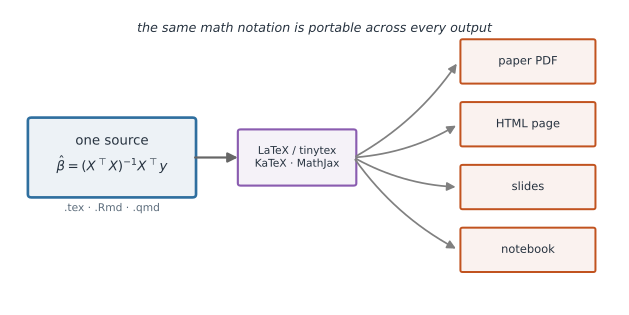
- The same math notation is portable across papers, slides, notebooks, and websites (via KaTeX/MathJax) (Figure 1).
Inline vs. Display Math#
Wrap math in dollar signs.
A single $...$ is inline (flows within a sentence); double $$...$$ is display (centered on its own line).
The estimator $\hat{\beta}$ is unbiased when the errors have mean zero.

$$
\hat{\beta} = (X^\top X)^{-1} X^\top y
$$
Do use inline math for symbols mentioned in prose. Don’t put large multi-line equations inline, they crowd the text; use display math.
Common Constructs#
| Source | Meaning |
|---|---|
\frac{a}{b} | fraction |
\sum_{i=1}^{n} x_i | sum from 1 to n |
\alpha, \beta, \gamma, \mu, \sigma | Greek letters |
x_i / x^2 | subscript / superscript |
X \sim N(\mu, \sigma^2) | “distributed as” () |
\bar{x}, \hat{\theta} | bar and hat accents |
\begin{bmatrix} a & b \\ c & d \end{bmatrix} | a matrix |
An example combining several of these:
$$
\bar{x} = \frac{1}{n} \sum_{i=1}^{n} x_i,
\qquad
X_i \sim N(\mu, \sigma^2)
$$
A Tiny Compilable Document#
A complete, minimal .tex file you can compile to PDF:
\documentclass{article}
\begin{document}

The sample mean is $\bar{x} = \frac{1}{n}\sum_{i=1}^{n} x_i$.

\begin{equation}
\hat{\sigma}^2 = \frac{1}{n-1}\sum_{i=1}^{n}(x_i - \bar{x})^2
\end{equation}

\end{document}
Using LaTeX from R#
You do not need a system-wide LaTeX install.
The tinytex R package installs a lightweight, self-contained distribution:
install.packages("tinytex")
tinytex::install_tinytex()   # one-time: sets up LaTeX for PDF rendering
With that in place, R Markdown and Quarto can render PDFs.
Math goes directly in the document using the same $...$ syntax:
---
title: "My Analysis"
output: pdf_document      # R Markdown; use `format: pdf` for Quarto
---

The mean is $\bar{x} = \frac{1}{n}\sum_{i=1}^{n} x_i$, and we assume
$X_i \sim N(\mu, \sigma^2)$.

```{r}
mean(c(1, 2, 3, 4))
```
Render from the R console or the command line:
Rscript -e 'rmarkdown::render("analysis.Rmd")'
quarto render analysis.qmd --to pdf
LaTeX from Python, Jupyter, and Julia#
- Jupyter / Python: Markdown cells render
$...$and$$...$$via MathJax, so notebooks display typeset math with no extra setup. Exporting to PDF (jupyter nbconvert --to pdf) uses LaTeX under the hood. - Julia: Quarto and Pluto/Documenter notebooks render the same LaTeX math syntax;
LaTeXStrings.jllets you put LaTeX in plot labels.
Journal Templates#
For submitting to journals, the rticles R package provides ready-made LaTeX templates for many publishers (PLOS, Elsevier, IEEE, and more).
You write in R Markdown and get a correctly formatted PDF, no need to reverse-engineer a journal’s style file.
install.packages("rticles")
# In RStudio: New R Markdown -> From Template -> pick a journal