Data Ingestion & APIs
A great deal of biological data lives in public repositories — sequences in GenBank, occurrence records in GBIF, pathogen genomes in GISAID, gene annotations in Ensembl. You could download it by clicking through a website, but that is slow, error-prone, and impossible to reproduce. An API (Application Programming Interface) lets your code request exactly the data you want, so the pull becomes a scripted, repeatable step in your analysis.
What an API Is#
An API is a programmatic front door to a remote database or service. Your code sends a request — a web address (endpoint) plus query parameters describing what you want — and the server sends back structured data, usually as JSON or XML, along with a status code saying whether it worked.
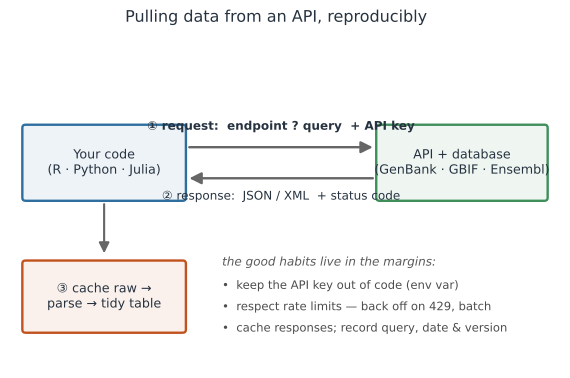
Fetching programmatically beats manual downloads because it is reproducible (the query is code, not a memory of which buttons you clicked), automatable (loop over 500 accessions), and current (re-run to refresh).
Parsing a Response#
The response comes back as text you parse into a table. In real code you would fetch it over the network; here we parse a canned response, which is exactly what you should do in examples and tests — never hit a live server from a test:
import json

# a GBIF-style response (fetched elsewhere; parsed offline here)
response = '''{"count": 2, "results": [
  {"scientificName": "Aedes aegypti", "year": 2021, "countryCode": "BR"},
  {"scientificName": "Aedes aegypti", "year": 2022, "countryCode": "US"}
]}'''

data = json.loads(response)
print("records:", data["count"])
for rec in data["results"]:
    print(f'  {rec["scientificName"]:<15} {rec["year"]}  {rec["countryCode"]}')
records: 2
  Aedes aegypti   2021  BR
  Aedes aegypti   2022  US
Most sources have a dedicated client package that handles the requests and parsing for you — reach for those before writing raw HTTP calls:
# R: purpose-built clients for the big repositories
library(rgbif);  occ_search(scientificName = "Aedes aegypti", limit = 500)
library(rentrez); entrez_fetch(db = "nuccore", id = ids, rettype = "fasta")
# Python: pygbif, Biopython Entrez, or requests for a generic REST API
from pygbif import occurrences
occurrences.search(scientificName="Aedes aegypti", limit=500)
Keys, Rate Limits, and Etiquette#
Pulling data from a shared server comes with responsibilities, and getting these wrong will (rightly) get you throttled or blocked.
- Authentication. Many APIs need an API key or token; NCBI, for instance, grants higher rate limits with one. Treat that key as a secret: read it from an environment variable, never paste it into a script or commit it — see Handling Secrets and API Keys.
- Rate limits. Servers cap how many requests you may send (NCBI allows ~3/second, or 10 with a key).
Exceed it and you get a
429 Too Many Requests; respond with exponential backoff, not a retry storm — the same backoff logic as any robust network code. - Batch and cache. Request many records per call rather than one at a time, and save the raw response to disk so a rerun parses the cache instead of re-hitting the server.
- Pagination. Large result sets arrive in pages; loop, advancing an offset or cursor, until you have them all — and log if you stop early.
- Terms of use. Respect each source’s agreement and license. GISAID in particular requires registered credentials and a data-use agreement; honor attribution and sharing terms everywhere.
Reproducibility of a Data Pull#
Public databases change over time — sequences are added, taxonomies revised, records corrected — so the same query can return different data next year. To keep an analysis reproducible:
- Record the exact query, the access date, and the database version or release.
- Store the accession IDs you used, and ideally the cached raw response, under version control or alongside the project data.
- Cite the database and access date in the methods — this is both good science and often a condition of use.
This is the ingestion-side complement to Reproducibility: a result is only reproducible if its inputs can be recovered.
Sources You’ll Meet in Biology#
| Source | Holds | Clients |
|---|---|---|
| NCBI / GenBank / Entrez | sequences, genomes, PubMed | rentrez, Biopython Entrez |
| GBIF | species occurrence records | rgbif, pygbif |
| GISAID | influenza / SARS-CoV-2 genomes (credentialed) | EpiCoV portal, feeds |
| Ensembl | gene annotation, comparative genomics | biomaRt, Ensembl REST |
| iNaturalist / OBIS | biodiversity observations | rinat, robis |
| NOAA / Open-Meteo | climate & weather covariates | REST + requests/httr2 |
For any source without a ready client, a generic HTTP library (httr2 in R, requests in Python, HTTP.jl in Julia) plus a JSON parser will do — the pattern in the figure above is always the same.
A Short Checklist#
- Script your data pulls through APIs instead of manual downloads.
- Prefer a dedicated client (
rgbif,rentrez,pygbif, Biopython) over raw HTTP. - Keep API keys in environment variables, never in code — see Handling Secrets.
- Respect rate limits with backoff, batch requests, and cache raw responses.
- Record the query, date, version, and accession IDs, and cite the source.
Related#
- Handling Secrets and API Keys — keeping tokens out of code
- Data Representation & File Formats — parsing the JSON/FASTA/VCF you pull down
- Reproducibility — recoverable inputs and provenance
- Debugging and Troubleshooting — retries, backoff, and reading status codes
- Version Control with Git & GitHub — tracking queries and cached data
- Programming & Computing