Data Representation & File Formats
Before you can analyze data you have to read it in correctly — and this is where a surprising number of silent errors are born. A misread encoding, a mangled CSV column, or data crammed into the wrong shape can corrupt a result without ever throwing an error. This page is about representing data so the computer reads it the way you meant, and about the formats you will actually meet in biology.
Text Encodings: Bytes to Characters#
A text file is a sequence of bytes; an encoding is the rulebook that maps those bytes to characters.
Almost everything today should be UTF-8, which covers every language and symbol.
Trouble appears when a file written in one encoding is read as another: an accented name or a Greek µ turns into garbage like µg — mojibake.
- Default to UTF-8 everywhere you can, and state the encoding explicitly when you read a file if there is any doubt.
- Beware a stray BOM (byte-order mark) at the start of a file, which can turn the first column name into
"id"and break a join. - Line endings differ across operating systems (
\nvs\r\n); configure your editor and Git to normalize them — see Computer Basics.
CSV Pitfalls#
The comma-separated file is the universal exchange format, and also a minefield. The reader has to guess the type of each column, and it often guesses wrong:
import io, pandas as pd

raw = "sample,barcode,ct\nS1,007,22.4\nS2,012,19.8\n"
df = pd.read_csv(io.StringIO(raw))
print(df)
print("barcode dtype:", df["barcode"].dtype)   # inferred as integer!
  sample  barcode    ct
0     S1        7  22.4
1     S2       12  19.8
barcode dtype: int64
The barcode column looked numeric, so it was read as an integer and 007 silently became 7 — the leading zeros, which were part of the identifier, are gone.
The fix is to tell the reader the type instead of letting it guess (dtype={"barcode": str} in pandas, col_types in R’s readr, types in CSV.jl).
Other classic CSV traps:
- Commas inside fields (“Aedes aegypti, larval”) must be quoted, or they split into extra columns.
- Spreadsheets auto-convert values. Excel turns the gene symbol
SEPT2into a date and2310021into a float — a problem so common that the HGNC renamed several human genes. Never let a spreadsheet touch identifiers. - Missing-value codes (
NA,-999,"",.) must be declared, or-999gets averaged in as a real number. - Decimal separators differ by locale (
3,14vs3.14).
Prefer plain-text, transparent formats for data and code, and keep a raw, read-only copy of the original file — see Computer Basics.
For large numeric data, binary columnar formats like Parquet or HDF5 are far faster and preserve types exactly; reserve .xlsx for hand inspection, never as your system of record.
Tidy & Relational Data#
How you shape a table decides how painful the analysis will be.
Tidy data follows three rules: each variable is a column, each observation is a row, and each type of observational unit is its own table.
A tidy table drops straight into dplyr, pandas, polars, or ggplot; a messy “wide” table (a column per week, say) fights you at every step — see Manipulating Data Frames.
The companion idea is relational data: rather than one giant spreadsheet with everything repeated, keep separate tidy tables linked by a shared key, and combine them with a join when needed.
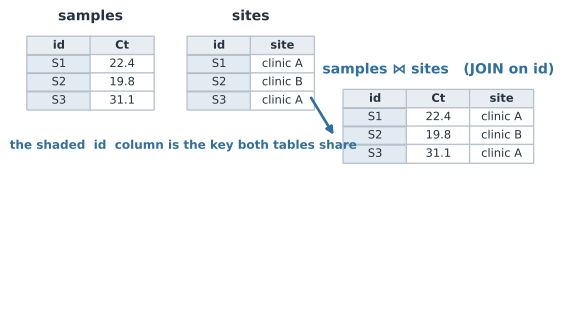
This is exactly the model behind SQL, the language of relational databases, whose core verbs you already think in:
-- pull site-level positivity from two joined tables
SELECT   site, AVG(ct) AS mean_ct, COUNT(*) AS n
FROM     samples
JOIN     sites USING (id)
WHERE    ct < 30
GROUP BY site;
You do not need a database server to use it.
dplyr (via dbplyr) compiles the same verbs to SQL, and DuckDB or SQLite will run SQL directly on a CSV or Parquet file — handy when the data is too big to hold in memory.
# R: dplyr speaks the same JOIN / filter / group-by grammar as SQL
library(dplyr)
samples |>
  inner_join(sites, by = "id") |>
  filter(ct < 30) |>
  group_by(site) |>
  summarise(mean_ct = mean(ct), n = n())
Domain Formats You’ll Meet#
Biology has its own zoo of file formats, most of them plain text with a defined structure. You will rarely parse them by hand — use the standard libraries — but you should recognize them:
| Format | Holds | Typical tools |
|---|---|---|
FASTA (.fa) | sequences (DNA/protein) | Biostrings (R), Biopython, FASTX (Julia) |
FASTQ (.fq) | sequencing reads + quality scores | ShortRead, Biopython, FASTX |
VCF (.vcf) | genetic variants across samples | vcfR, cyvcf2, GeneticVariation.jl |
| SAM/BAM | read alignments to a reference | Rsamtools, pysam, XAM.jl |
| GFF/GTF/BED | genome feature annotations | rtracklayer, gffutils |
| Newick / Nexus | phylogenetic trees | ape, Bio.Phylo, Phylo.jl |
# Read a FASTA with a library, not a hand-written parser
from Bio import SeqIO
for record in SeqIO.parse("sequences.fasta", "fasta"):
    print(record.id, len(record.seq))
The rule of thumb: use the format built for the data (FASTA for sequences, VCF for variants, Parquet for big tables) and a maintained parser for it, rather than flattening everything into ad-hoc CSVs you have to re-interpret later.
A Short Checklist#
- Use UTF-8; state the encoding when reading if there’s any doubt.
- Set column types explicitly when reading CSVs — don’t let
007become7. - Keep identifiers away from spreadsheets, which mangle gene symbols and codes.
- Declare missing-value codes so
-999isn’t averaged in. - Shape data tidily, and keep it relational — separate tables joined on a key.
- Store data in the right format (Parquet/HDF5 for big arrays; FASTA/VCF for their domains), and keep a read-only copy of the raw source.
Related#
- Computer Basics for Scientists — files, plain text vs binary, line endings
- Manipulating Data Frames — the tidy tools you feed clean data into
- Data Structures & Choosing the Right Container — tables, keys, and lookups in memory
- Regular Expressions & Finite-State Machines — parsing the messy text these formats arrive in
- Reproducibility — raw data, provenance, and read-only inputs
- Programming & Computing