Project Workflow
A project you can hand to a colleague — or return to in a year — is one where the structure tells the story. A little discipline about folders, raw data, and a build pipeline pays off every time you re-run the analysis.
A sensible folder structure#
Keep one directory per project, self-contained, with a predictable layout:
flu-forecast/
├── README.md            # what this is, how to run it
├── Makefile             # the pipeline, start to finish
├── data/
│   ├── raw/             # inputs exactly as received — READ ONLY
│   └── derived/         # cleaned/processed data your scripts create
├── R/                   # (or src/, python/) reusable functions
├── scripts/             # numbered, stage-ordered analysis scripts
│   ├── 01-clean.R
│   ├── 02-fit.R
│   └── 03-forecast.R
├── output/
│   ├── figures/
│   └── tables/
└── docs/                # the writeup / report
Numbering scripts by stage (01-, 02-, …) makes the intended run order obvious and sorts them correctly in a file listing.
Never edit raw data#
Treat data/raw/ as immutable — the ground truth you can always fall back to.
Every cleaning step happens in code and writes to data/derived/.
This means:
- You can always reconstruct derived data from raw + scripts.
- A cleaning mistake is a one-line fix and re-run, not a lost dataset.
# GOOD: read raw, write derived; raw is never overwritten
raw <- read.csv("data/raw/cases.csv")
clean <- subset(raw, !is.na(onset_date))
write.csv(clean, "data/derived/cases_clean.csv", row.names = FALSE)
Set the raw files read-only if you want the machine to enforce it:
chmod -R a-w data/raw/
Use project-relative paths#
Absolute paths like /Users/you/Desktop/stuff/cases.csv break the moment anyone else (or future-you on a new laptop) runs the code.
Anchor everything to the project root.
# BAD
read.csv("/Users/dewitt/projects/flu/data/raw/cases.csv")

# GOOD: relative to the project root, found automatically
library(here)
read.csv(here("data", "raw", "cases.csv"))
# GOOD: resolve paths relative to the project root
from pathlib import Path
ROOT = Path(__file__).resolve().parents[1]
cases = pd.read_csv(ROOT / "data" / "raw" / "cases.csv")
# GOOD: @__DIR__ anchors to this file's location
root = normpath(joinpath(@__DIR__, ".."))
cases = CSV.read(joinpath(root, "data", "raw", "cases.csv"), DataFrame)
Analysis as a DAG#
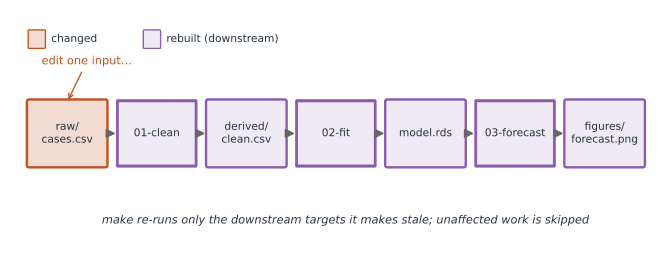
Think of your analysis as a directed acyclic graph (DAG): raw data feeds cleaning, cleaning feeds modelling, modelling feeds figures. Each step depends only on earlier ones. Framed this way, a build tool can figure out what needs to re-run when a single input changes — and skip the rest (Figure 1).
raw/cases.csv ──▶ 01-clean ──▶ derived/clean.csv ──▶ 02-fit ──▶ model.rds ──▶ 03-forecast ──▶ figures/
Drive the pipeline with a build tool#
Don’t run scripts by hand in a half-remembered order. A build tool encodes the DAG and reproduces everything with one command.
A tiny Makefile:
all: output/figures/forecast.png

data/derived/cases_clean.csv: scripts/01-clean.R data/raw/cases.csv
	Rscript scripts/01-clean.R

output/model.rds: scripts/02-fit.R data/derived/cases_clean.csv
	Rscript scripts/02-fit.R

output/figures/forecast.png: scripts/03-forecast.R output/model.rds
	Rscript scripts/03-forecast.R

clean:
	rm -f data/derived/* output/model.rds output/figures/*
Now make runs only the stages whose inputs changed.
In R, the targets package expresses the same DAG natively; in Python, snakemake or a simple Makefile does the job.
Make, just, or Task?#
make is not the only option, and the alternatives trade its cryptic, tab-sensitive syntax for readability.
- GNU Make — the classic, on virtually every machine. It is built around file targets and timestamps, so it rebuilds only outputs whose inputs changed; ideal for a data-analysis DAG. The syntax is terse and famously picky about tabs.
just— a modern command runner (source). Ajustfileholds named recipes with a clean syntax and easy parameters, but it does not track file dependencies — it runs commands rather than rebuilding stale targets. It is perfect for project shortcuts likejust buildorjust test(this site is built with one).- Task — a cross-platform runner configured in a YAML
Taskfile.yml. It sits in between: readable likejust, but with optionalsources/generateschecks that skip up-to-date tasks likemake.
Rule of thumb: reach for Make or Task when you want rebuild-what-changed dependency tracking, and just when you mainly want memorable aliases for the commands you run all day.
A README that gets you started#
Every project should open with a README.md answering: what is this, what do I need installed, and how do I run it (ideally: “run make”).