Version Control with Git & GitHub
Git is a tool that records the history of your project so you can undo mistakes, collaborate without emailing files back and forth, and back up your work. GitHub is the most popular place to host Git projects online, and a public GitHub profile doubles as a portfolio that employers and collaborators can browse.
Why Version Control?#
- History: every saved state (a commit) is recoverable. Break something? Roll back.
- Collaboration: multiple people can work on the same project and merge their changes.
- Backup: pushing to GitHub keeps an off-machine copy of your work.
- Portfolio / resume: a tidy public repo of real projects is a credible demonstration of your skills.
Core Mental Model#
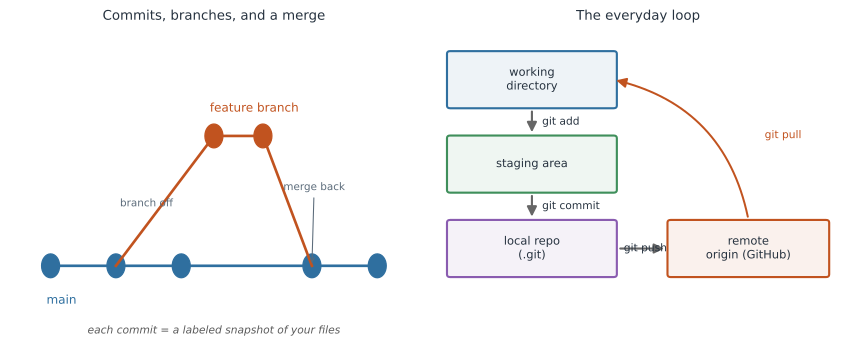
The two diagrams in Figure 1 capture the whole model: a history of commits with branches on the left, and the everyday add–commit–push–pull loop on the right.
- Repository (repo): a project folder that Git is tracking, plus its full history.
- Commit: a labeled snapshot of your files at a moment in time, with a message describing the change.
- Branch: an independent line of development.
mainis the default; feature branches let you experiment safely. - Remote: a copy of the repo hosted elsewhere (e.g., on GitHub), usually named
origin.
One-Time Setup#
git config --global user.name "Your Name"
git config --global user.email "you@example.com"
Start a repo in a new project, or grab an existing one:
git init                 # turn the current folder into a Git repo
# ...or clone an existing repo from GitHub:
git clone https://github.com/username/project.git
The Everyday Loop#
This four-step cycle is the core of daily Git use:
git status                 # 1. see what has changed
git add analysis.R data/   # 2. stage the changes you want to record
git commit -m "Add case-count cleaning step"   # 3. record a snapshot
git push                   # 4. upload commits to GitHub (the remote)
Before starting work (especially when collaborating), pull the latest changes from the remote:
git pull # fetch and merge others' changes into your copy
.gitignore#
A .gitignore file lists paths Git should never track, secrets, large data, and generated output.
# .gitignore
.env
.Renviron
*.csv
output/
.DS_Store
Do commit your code and small text files. Don’t commit secrets, huge datasets, or generated artifacts, they bloat the repo and can leak sensitive information.
Commit Early, Commit Often, With Good Messages#
Small, frequent commits make history easy to read and mistakes easy to isolate.
# Good: specific, present-tense, explains the change
git commit -m "Fix off-by-one in age-group binning"

# Bad: vague and unhelpful
git commit -m "stuff"
Do write a message that finishes the sentence “This commit will…”. Don’t lump a week of unrelated changes into one giant commit.
GitHub as a Professional Showcase#
- Add a clear
README.mdto each repo explaining what the project does and how to run it. - Pin your best repositories on your profile.
- Keep repos public when the work is shareable, they become links you can put on a CV or website.
Learn More#
For a gentle, R-focused introduction that walks through installation and RStudio integration, see Happy Git with R.